

Intro to Windows Server 2008 Training
Intro to Windows Server 2008 Training
6+ Hours of Windows Server 2008 Training on DVD, FREE with ALL Orders!
Order Online or give us a Call. We will automatically include a free copy of our Intro to Windows Server 2008 Training on DVD with every order that we ship.
Learn about IIS 7, Server Core, WDS, RODC, and much more!
Limited Quantities Available! This offer is only good until supplies run out. Want to learn more about Windows Server 2008? Well this is the perfect chance for you to get our FREE Windows Server 2008 Training. Just pick your favorite product from our wide selection of training videos, and we will Automatically send you this training absolutely FREE! You can't beat that, so hurry and get this great offer while supplies last!About this course:This course is a 6 hour training course to introduce you to Windows Server 2008. It will teach you about some of the neat new features that are available in Window Server 2008 and how to configure them. This course is just the beginning. We will be launching an entire Windows Server 2008 Training series that will include complete coverage of the MCITP certifications and much more, totaling over 150 hours of training. The Intro to Windows Server Training DVD is not an exam prep course and does not go into as much depth as our Windows Server 2008 training series will, but it gives you a great opportunity to get ahead of the crowd and start working on Windows Server 2008.Here's what we cover in our Intro to Windows Server 2008 Training Course:Installing Windows Server 2008 and Active Directory
Server Edition Check
Installation Procedure
Initial Configuration of Windows Server 2008
Adding Active Directory to Windows Server 2008
Promotion of a Windows 2008 server to a Domain Controller Active Directory Users and Groups in Windows Server 2008
Active Directory Review What's New in 2008
Windows Server 2008 Server Manager
Active Directory Auditing
Renaming the Administrator Account
Creating Users
Creating Groups
Adding Users to Groups
Event Viewer in Server 2008 Windows Server Core and DHCP Servers
What is Server Core?
What can Server Core do? Server Core Roles
How to Set the Admin Password in Server Core
Rename the Computer in Server Core
Join a Domain in Server Core
DHCP Role Installation
Critical Commands to know for Server Core
Set Up the Windows Firewall on Server 2008
Install RSAT
Create an MMC to Connect to Windows Server Core Windows Server 2008 File and Print Servers
What's New with File and Print Server
Install File Server Roles in Windows Server 2008
Create a Namespace
Setup Up Replication (DFS)
Add a Print Server to Windows Server 2008
Add a Network Printer
Print Management Console
Deployed Printers Windows Server 2008 Read Only Domain Controllers
What's a Read Only Domain Controller (RODC)
Advantages of Read Only Domain Controllers (RODC)
Steps to Deploy a Read Only Domain Controller (RODC)
RODC Role Installation
Password Replication
Pre-Populate a Password IIS 7 Web Servers
New Features in IIS 7
Modularization
Role Installation
Selection of Modules
IIS Manager
Speed Up Your Index Page Load
Where to Put Your Files
Browse Your Site Windows Server 2008 Terminal Services
Terminal Services New Features
Remote Application
Installing a Terminal Server
Configuring RemoteApp Windows Deployment Services
Quick Intro to Imaging
Windows Deployment Services (WDS) Configuration Procedure
Installation of Windows Deployment Services (WDS) Role
Image Locations
Boot Image Import
Create Capture Boot Image
Create an Image Group
Add Install Images
Capture an Image
Deploy from Windows Deployment Services (WDS) Windows Server 2008 MCITP Certification Info
Certifications
Upgrade Certifications
Features in Extended Server 2008
Part 1 Part 2 Part 3 Part 4 Part 5 Part 6 Part 7 Part 8 Part 9
R.lick and download with IDM ( not save target or download by IE )
When you download complete . You need Join 9 part . You have 1 file
WDSV2008_VNDL.master8x
Replace WDSV2008_VNDL.master8x ->WDSV2008_VNDL.rar -> OK
Unrar and Enjoy .
Monday, 2 June 2008
Intro to Windows Server 2008 Training - Cool

Saturday, 31 May 2008
Implementing and Administering Security in a Microsoft Windows Server 2003 Network 70-299
Implementing and Administering Security in a Microsoft Windows Server 2003 Network
Links
Np Pass
Enjoy
Designing Security for a Windows Server 2003 Network 70-298
Designing Security for a Windows Server 2003 Network
Links
No Pass
Enjoy
Designing a Windows Server 2003 Active Directory and Network Infrastructure 70-297
Designing a Windows Server 2003 Active Directory and Network Infrastructure
Links
No Pass
Enjoy
Thursday, 29 May 2008
Planning, Implementing, and Maintaining a Windows Server 2003 Active Directory Infrastructure 70-294
Planning, Implementing, and Maintaining a Windows Server 2003 Active Directory Infrastructure
Links
No pass
Enjoy
Planning and Maintaining a Windows Server 2003 Network Infrastructure 70-293
Planning and Maintaining a Windows Server 2003 Network Infrastructure
Links
No pass
Enjoy
Wednesday, 28 May 2008
Implementing and Managing Microsoft Exchange Server 2003 70-284
Implementing and Managing Microsoft Exchange Server 2003
Links
No pass
Tuesday, 27 May 2008
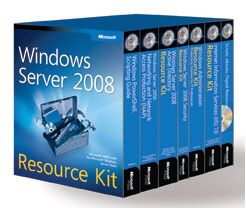
Windows Server 2008 Resource Kit
Windows Server 2008 Resource Kit
Product Description:
Get the essential reference for deploying, managing, automating, troubleshooting, and optimizing Windows Server 2008 with expert insights and best practices from Microsoft Most Valuable Professionals (MVPs) and the Windows Server team at Microsoft. This official Microsoft® RESOURCE KIT features six volumes of in-depth technical information that every Windows® administrator needs to understand to master Windows Server 2008 administration. You get detailed information about networking, network aspect projection, security features, Internet Information Services (IIS) 7.0, Active Directory®, and Windows PowerShellTM. You also get more than 200 time-saving tools, scripts for automation, job aids, eBook resources.
Key Book Benefits:
Provides six volumes of in-depth technical information for administering, optimizing, troubleshooting, and automating Windows Server 2008Delivers definitive product information with expert insights straight from the Windows Server team at Microsoft, Microsoft MVPs, and field consultantsDetails information that every Windows administrator needs about Windows Server performance, troubleshooting, security services, group policy, Active Directory, IIS 7, and Windows PowerShell
From the Publisher:
* Provides six volumes of in-depth technical information for administering, optimizing, troubleshooting, and automating Windows Server 2008 and IIS 7.0
* Delivers definitive product information with expert insights straight from the Windows Server team at Microsoft, Microsoft MVPs, and field consultants
* Details what every Windows Server administrator needs to know about performance, troubleshooting, security services, Group Policy, Active Directory, IIS 7, and Windows PowerShell
* Features a CD with more than 200 essential tools and scripts, eBooks with additional technical information, tips, and best practices--plus a fully searchable eBook of all six RESOURCE KIT volumes
Part 1 Part 2 Part 3 Part 4 Part 5
pass
hxxp://networkmanagers.googlepages.com
replace xx-> tt
Sunday, 25 May 2008
CBT 70-293
Cbt 70-293
MCSE 2003: Exam-Pack 70-293
Planning and Maintaining a Microsoft Windows Server 2003 Network Infrastructure

This training focuses on how to design and plan for a Windows Server 2003 network infrastructure. You'll learn about a variety of networking topics as well as numerous options available from Microsoft such as Terminal Services and Software Update Services. Security features in Server 2003 have been significantly upgraded from Server 2000 and this training covers security templates, remote authentication, private keys, smart cards, wireless security and the Microsoft Baseline Security Analyzer.
Instructor James Conrad is one of the leading experts on Server 2003 and provides numerous tips, tricks and real-world examples to help you learn the technology as well as put it to use. James delivers the material with a quick-wit and easy going style that makes it easy to comprehend complex topics.
There are 27 videos providing more than 13 hours of instruction. A basic understanding of computers and networking, such as the A+/Network+ Combo Pack, as well as the material covered in Exam-Packs 70-290 and 70-291 is recommended before viewing this training.
Exam Pack 70-293 Contents:
- Series Intro- Operating Systems and Server Roles- Security Settings- Security Settings and GPO- Security Templates- Network Planning and Design- TCP/IP Planning: Addresses and Subnetting- IP Configuration- Internet Connectivity- Routing: Static, RIP, and OSPF- Remote Access Authentication & Policies- WINS- DNS Part 1- DNS Part 2- Private Key Infrastructure Part 1- Private Key Infrastructure Part 2- Enrollment- Smart Cards- Wireless Security Part 1- Wireless Security Part 2- IPSec Part 1- IPSec Part 2- Performance, Network Load-Balancing, Clustering Part 1- Network Load-Balancing, Clustering Part 2- Microsoft Baseline Security Analyzer, Software Update Services- Remote Assistance and Terminal Services- System Recovery
Microsoft is a registered trademark of Microsoft Corporation
Part 1 Part2 Part 3 Part 4 Part 5 Part6
pass
hxxp://networkmanagers.googlepages.com
replace xx->tt
Saturday, 24 May 2008
Administering SQL Server 2000 Course Suite
Administering SQL Server 2000 Course Suite
Microsoft Certified Systems Engineers are those who have become experts in designing and implementing infrastructure on the Microsoft Windows platform. In order to become MCSE certified, students must complete and pass six core examinations and one elective exam. The required core exams are four networking system exams, one client operating system exam, and one design exam. Through these seven exams MCSE's show proficiency that is recognized throughout the IT industry.
Microsoft reports that MCSE candidates should have at least one year of experience implementing and administering network operating systems and desktop operating systems.
TestOut has designed a fast and engaging certification training course to help students prepare for the MCSE certification exam. Through our multimedia technologies and simulations each user can familiarize themselves with the tasks associated with actual test concepts and objectives and get hands-on experience before taking the MCSE certification exam. Our MCSE training course is the market leading self-paced training tool and is guaranteed to help you pass your MCSE certification test.
Part 1 Part 2 Part 3 Part 4
Pass
hxxp://networkmanagers.googlepages.com
replace xx->tt

Thursday, 22 May 2008
CBT NUGGETS MICROSOFT 70-284
CBT NUGGETS MICROSOFT 70-284
part 1
part 2
part 3
part 4
pass
http://networkmanagers.googlepages.com

 Posts
Posts

